Step 1: Create Authentication SSH-Keygen Keys on the originating machine.
$ ssh-keygen -t rsa
On Windows you could use puttygen.exe
Use a passphrase to protect keys.
On Linux private key goes to .ssh/id_rsa
Public key goes to id_rsa.pub
Step 2: Create .ssh Directory on the destination machine.
Step 3: Upload Generated Public Keys to the destination machine.
$ cat .ssh/id_rsa.pub | ssh <username>@<destination_ip> 'cat >> .ssh/authorized_keys'
<username> should be the login on the destination machine.
<destination_ip> is the public IP of the destination machine.
Step 4: Set Permissions on the destination machine.
$ ssh <username>@<destination_ip> "chmod 700 .ssh; chmod 640 .ssh/authorized_keys"
<username> should be the login on the destination machine.
<destination_ip> is the public IP of the destination machine.
Step 5: Login from originating machine to destination machine without password.
$ ssh <username>@<destination_ip>
<username> should be the login on the destination machine.
<destination_ip> is the public IP of the destination machine.
On Windows you could use putty.exe
Taken from https://www.tecmint.com/ssh-passwordless-login-using-ssh-keygen-in-5-easy-steps/
Saturday, July 3, 2021
SSH Passwordless Login Using SSH Keygen in 5 Easy Steps.

Sunday, February 28, 2021
2021 Holiday Schedule
| Date | Holiday |
|---|---|
| Friday, January 1 | New Year’s Day |
| Monday, January 18 | Birthday of Martin Luther King, Jr. |
| Wednesday, January 20* | Inauguration Day |
| Monday, February 15** | Washington’s Birthday |
| Monday, May 31 | Memorial Day |
| Monday, July 5*** | Independence Day |
| Monday, September 6 | Labor Day |
| Monday, October 11 | Columbus Day |
| Thursday, November 11 | Veterans Day |
| Thursday, November 25 | Thanksgiving Day |
| Friday, December 24**** | Christmas Day |
*This holiday is designated as "Inauguration Day" in section 6103(c) of title 5 of the United States Code, which is the law that specifies holidays for Federal employees. Federal employees in the Washington, DC area are entitled to a holiday on the day a President is inaugurated, January 20 for each fourth year after 1965. Though other institutions such as state and local governments and private businesses may use other names, it is our policy to always refer to holidays by the names designated in the law.
**This holiday is designated as "Washington’s Birthday" in section 6103(a) of title 5 of the United States Code, which is the law that specifies holidays for Federal employees. Though other institutions such as state and local governments and private businesses may use other names, it is our policy to always refer to holidays by the names designated in the law.
***July 4, 2021 (the legal public holiday for Independence Day), falls on a Sunday. For most Federal employees, Monday, July 5, will be treated as a holiday for pay and leave purposes. (See 5 U.S.C. 6103(b).)
****December 25, 2021 (the legal public holiday for Christmas Day), falls on a Saturday. For most Federal employees, Friday, December 24, will be treated as a holiday for pay and leave purposes. (See section 3(a) of Executive order 11582, February 11, 1971.)
Taken from: https://www.opm.gov/policy-data-oversight/pay-leave/federal-holidays/#url=2021
Capturing with Perl and REGEX two numbers on a line, one of them is optional
use strict;
use warnings;
sub get_long_short {
my ($number, $spaces1, $spaces2) = @_;
my ($long, $short) = ('', '');
if (length($spaces1) > length($spaces2))
{
$short = $number;
} else {
$long = $number;
}
return ($long, $short);
}
while (<DATA>) {
chomp();
if (my ($b1, $n1, $n2, $b2, $s) = /
^(\s*) # First spaces ($b1)
([\d,.]+) # First number always exists ($n1)
(?: # Don't want to capture spaces
\s+ # in front
([\d,.]+) # Second number ($n2)
)? # Second number is optional
(\s+) # Space always exists ($b2)
(\w{2,3})$ # Two or three letters symbol ($s)
/x)
{
my ($long, $short);
if (defined($n2)) {
$long = $n1;
$short = $n2;
} else {
($long, $short) = get_long_short($n1, $b1, $b2);
}
$long =~ s/,//g;
$short =~ s/,//g;
print("$long|$short|$s\n");
} else {
print("NOT MATCHED: $_\n");
}
}
__END__
long short symbol
12 3 NG
1,234 1,222 CL
1,333 PL
123.4 9,088 HNG
123.4 9,088 BBBB
90.65 HO
1 RB
2 RB
3 RB
4 RB
100,000.00 CL
CL
Monday, January 18, 2021
isLeapYear in PHP
Friday, June 12, 2020
VBA Excel module for reading INI files.
Option Explicit
' Retrieves a string from the specified section in an initialization file.
' See here: https://docs.microsoft.com/en-us/windows/win32/api/winbase/nf-winbase-getprivateprofilestring?redirectedfrom=MSDN
' lpApplicationName The name of the section containing the key name.
' lpKeyName The name of the key whose associated string is to be retrieved.
' lpDefault A default string.
' lpReturnedString A pointer to the buffer that receives the retrieved string.
' nSize The size of the buffer pointed to by the lpReturnedString parameter, in characters.
' lpFileName The name of the initialization file.
Private Declare Function GetPrivateProfileString Lib "Kernel32" Alias "GetPrivateProfileStringA" ( _
ByVal lpApplicationName As String, _
ByVal lpKeyName As Any, _
ByVal lpDefault As String, _
ByVal lpReturnedString As String, _
ByVal nSize As Long, _
ByVal lpFileName As String) As Long
' Given a key it returns the associated value from an INI file.
' iniFileName should specify a valid path.
' jesus.aneiros@gmail.com
' 2020.06.11
Public Function readIniFileString(ByVal iniFileName As String, ByVal sectionName As String, ByVal keyName As String) As String
Dim lResult As Long
Dim retString As String * 255
Dim retStringSize As Long
' The buffer
retString = Space(255)
' Returns the number of caracters copied to the buffer retString
lResult = GetPrivateProfileString(sectionName, keyName, "", retString, Len(retString), iniFileName)
If (lResult) Then
readIniFileString = Left$(retString, lResult)
Else
readIniFileString = ""
End If
End Function
Public Sub test()
Debug.Print readIniFileString(ThisWorkbook.Path & "\model_c.ini", "DB", "host")
Debug.Print readIniFileString(ThisWorkbook.Path & "\model_c.ini", "EMAIL", "host")
End Sub
Thursday, June 11, 2020
VBA Excel copy sheets from closed workbook
' Copies sheets ranges (values and formats) from a closed workbook into
' a sheet on the opened workbook.
Private Sub copySheets(fileName As String, sheetName As String, dstSheetName As String, rng As String)
Sheets(dstSheetName).Cells.Clear
Dim srcWB As Workbook
' Open the source workbook and copy the values
Set srcWB = Workbooks.Open(fileName)
srcWB.Sheets(sheetName).Range(rng).Copy
ThisWorkbook.Activate
' Paste values and formats
With Sheets(dstSheetName)
.Range(rng).PasteSpecial Paste:=xlPasteFormats
.Range(rng).PasteSpecial Paste:=xlPasteColumnWidths
.Range(rng).PasteSpecial Paste:=xlPasteValuesAndNumberFormats
End With
' Get out of the copy mode
Application.CutCopyMode = False
' Close the source workbook without saving
srcWB.Close savechanges:=False
End Sub
' An example of use
Public Sub diff()
Dim fileName As String
' Copy 2 sheets from 2 different files
' The first file
' Get the file names from a cell
fileName = Sheets("Main").Range("B1").Value
copySheets fileName, "Summary", "Summary", "A1:M26"
copySheets fileName, "Day Positions", "DayPositions", "A1:N32"
' The second file
fileName = Sheets("Main").Range("B2").Value
copySheets fileName, "Summary", "SummaryNew", "A1:M26"
copySheets fileName, "Day Positions", "DayPositionsNew", "A1:N32"
ThisWorkbook.Sheets("Diff").Activate
ThisWorkbook.Save
End Sub
Saturday, April 4, 2020
Project Valhalla
The OpenJDK page:
http://openjdk.java.net/projects/valhalla/
State of Valhalla (Brian Goetz):
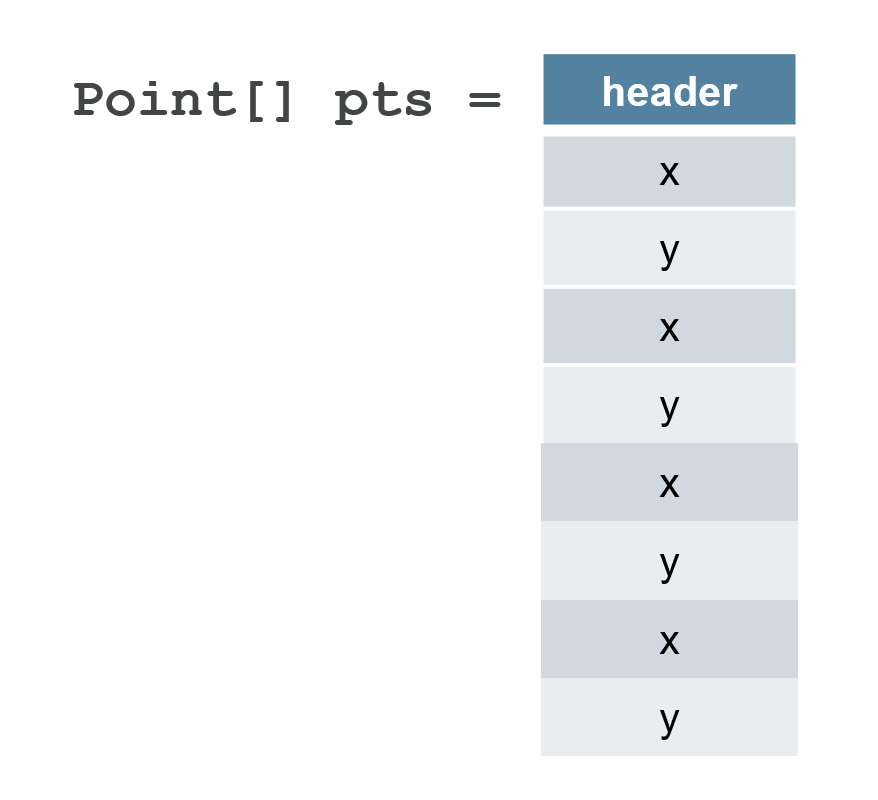
Basically going from:
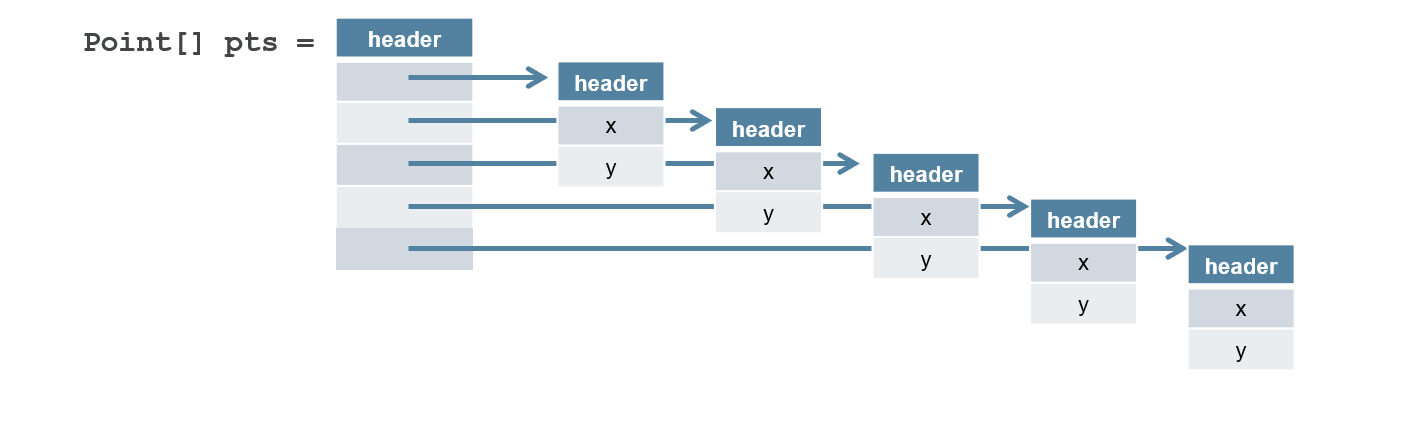
To: